

Campus Tour Headsets: A Practical Buying Guide
- 09 Nov, 2026
Campus tour headsets are personal listening devices used with a tour guide audio system to deliver a guide’s narration to visitors as they walk. A typical system pairs a guide’s microphone and transmitter with visitor receivers and headphones, helping the group follow commentary without relying solely on the guide’s unamplified voice. To choose among tour guide systems for campus and group visits, start with your largest group, actual route, and equipment turnaround process.
Key takeaways
- Buy for the number of people who need to listen, not just your average tour attendance.
- Test the full route, including building transitions and the back of the group.
- Confirm kit contents, charging arrangements, and simultaneous-tour support before ordering.
- For property and construction visits, plan around access rules, required protective equipment, and safe stopping points.
- Make distribution, cleaning, and return procedures part of the purchase decision.
How to Choose Campus Tour Headsets
Start with the tour rather than a feature list. A short admissions walk, an open house with overlapping groups, and a technical facilities visit create different operating needs. Write down what staff must accomplish before comparing equipment.
Count listeners and presenters separately
Count everyone who needs a listening device: prospective students, parents, counselors, and accompanying staff. Then identify who will speak. A student ambassador leading alone is a different setup from a guide handing commentary to a faculty member.
Do not assume a kit’s person count tells you every included component. Confirm the receiver quantity, transmitter quantity, microphone type, listening accessories, and charging equipment against your planned use.
Map the route and tour schedule
List indoor and outdoor stops, stairways, elevators, busy intersections, and any location where the group stretches out. Include both the normal route and the weather backup route. Wireless performance can change with buildings, obstructions, and the surrounding radio environment, so an actual route test is more useful than a distance figure alone.
- Attendance: What is the largest group you will equip at once?
- Schedule: How long is each tour, and how quickly does the next one depart?
- Overlap: Will separate groups pass one another or share a lobby?
- Presenters: Will one guide speak, or must other speakers participate?
- Storage: Where will equipment be secured and prepared between tours?
Campus, Real Estate, and Construction Tour Audio Compared
The basic purpose is similar: deliver spoken commentary to a moving group. The buying priorities differ because the route, surroundings, and operating procedures differ.
| Tour setting | Planning priority | What to test | What to confirm |
|---|---|---|---|
| 🏫 Campus admissions | ✅ Group size and turnover | ✅ Indoor/outdoor route | ✅ Listener count and charging |
| 🏠 Real estate walkthrough | ✅ Commentary across rooms | ✅ Floors and doorways | ✅ Speaker handoff process |
| 🏗️ Construction site visit | ✅ Safe use around site activity | ✅ Approved visitor route | ✅ Site approval and PPE fit |
Campus tours: make repeated departures manageable
For admissions teams, equipment handling deserves as much attention as the walk itself. Decide who distributes receivers, demonstrates the controls, checks that visitors can hear, and collects equipment afterward. Give guides a consistent pre-departure routine so each group starts with a listening check rather than troubleshooting on the first stop.
If tours overlap, ask how the proposed system separates groups and how staff select the appropriate settings. Do not assume that every wireless kit supports the same number of simultaneous groups.
Real estate tour audio system: plan for rooms and questions
A real estate tour audio system should be evaluated on the property you intend to show. Test commentary through doorways, between floors, and at the places where visitors naturally pause. A route that works in an open lobby may behave differently when listeners enter separate rooms.
Also plan how visitors ask questions. A guide-to-listener setup does not automatically provide visitor talk-back. If two-way discussion or multiple presenters matter, make those requirements explicit before choosing equipment. Otherwise, schedule question stops where the guide can hear visitors directly and repeat questions for the group.
Construction site tour headsets: safety comes first
Choose construction site tour headsets only after the site’s safety lead reviews the proposed listening arrangement. Ask how it will work with required protective equipment and whether visitors can remain attentive to site instructions and surrounding activity.
Do not treat a tour listening accessory as hearing protection. Confirm protective equipment separately, follow the site’s visitor procedures, and use approved stopping areas for commentary. Equipment suitability for dust, moisture, impacts, or other site conditions also needs confirmation before use.
A Practical Checklist for Any Site Tour System
A site tour system needs a repeatable operating process. Use the following checks during evaluation and again when training staff.
Before purchasing
- Request an itemized list of everything included in the selected configuration.
- Confirm how many visitors can listen and how many presenters can speak.
- Ask about power requirements, charging time, operating duration, and replacement accessories.
- Confirm the procedure for running nearby groups without unintended shared audio.
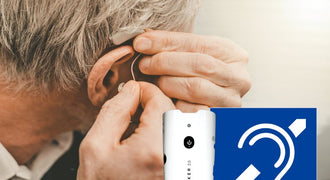
- Review listening accessory options for visitors with different comfort or hearing needs.
- Confirm cleaning instructions and suitable storage or carrying arrangements.
During a route test
- Use the planned microphone and listening accessories.
- Have someone listen at the front, middle, and back of the group.
- Test building entrances, turns, elevators, and other route transitions.
- Check the system while another group operates nearby, if that reflects normal use.
- Practice a speaker handoff and a visitor question stop.
- Record problem locations and adjust the route or procedure before launch.
Between departures
Count equipment back in, separate anything needing attention, and clean shared accessories according to their instructions. Check power readiness before redistributing devices. Keep a simple issue log so staff can distinguish a recurring equipment problem from a particular route location or setup mistake.
Choose a Tour Guide Kit for Your Group
Conference Microphones offers the following kit sizes to compare. Use the named capacity as a starting point, then verify the exact configuration against your listener and presenter counts. The product pages show current pricing.
A 10-person option for a smaller planned group
The 10-person portable translation and tour guide system, SKU TSC-10, is listed for tour guide and interpretation applications. Its description also identifies schools, employee training, and factory tours among possible uses.

The listing offers a no-case configuration and an option with a CAS-10 carrying case. Compare those configurations with your transport and storage plan. Confirm the included components before assigning the kit to a particular number of visitors.

A 20-person option for a larger planned group
The 20-person portable translation and wireless tour guide system, SKU TSC-20, provides another listed group-size option. Its configurations include no case, a CAS-725 carrying/shipping case, or a CAS-325 economy carrying case.


When comparing these kits, match the configuration to your actual attendance and handling needs. For multiple departures or several guides, confirm the full equipment plan rather than assuming one larger kit will cover every operating arrangement.
Frequently Asked Questions
What is the difference between campus tour headsets and a complete tour guide system?
The headset or earphone is the listening accessory. A typical complete tour guide arrangement also uses a guide’s microphone and transmitter plus visitor receivers. Product terminology varies, so verify the itemized contents rather than assuming a headset listing includes every component needed for a tour.
Should we choose a 10-person or 20-person tour guide kit?
Start with the maximum number of people who need to listen at the same time. The TSC-10 and TSC-20 are listed as 10-person and 20-person systems, respectively. Confirm receiver quantities and presenter equipment before matching either kit to your attendance.
Can the same equipment serve campus and real estate tours?
A tour guide system may suit both workflows, but evaluate each route separately. Buildings, room layouts, presenter handoffs, and question handling can change the requirements. Do not assume a successful outdoor campus test establishes performance throughout a multistory property.
Can visitors ask questions through their listening devices?
Do not assume they can. A guide-to-listener system delivers narration but does not necessarily include a return audio path. Confirm two-way capability if required, or plan question stops where the guide hears and repeats each question.
What should we check before using headsets on a construction site?
Obtain the site safety lead’s approval, check compatibility with required protective equipment, and confirm environmental suitability. Plan approved stopping points and visitor instructions. Evaluate hearing protection separately from tour audio equipment.
What should we plan for shared listening accessories?
Provide a clear return point, follow the accessory manufacturer’s cleaning instructions, and inspect equipment before reuse. Ask about alternative listening accessories when comfort or hearing needs vary. Confirm compatibility before promising a particular option to visitors.
Ready to build your equipment shortlist? Explore the full range of tour guide systems for campus, property, and site tours, then compare kit contents and configurations against your group size, route, and daily operating checklist.